
Automation that doesn't stop when the integration does.
Describe the work you need done. Workload builds and runs the automation across the apps you already use—then monitors and repairs it so it keeps working.
Describe the work. Workload gets it done.
Start free • No credit card required
Prefer to build manually? Open the workflow builder.You shouldn't need to know how to automate it.
You know the result you want. Workload figures out the steps, works across your software, and keeps the automation running after you turn it on.
“When a new referral comes in, create the patient record, text the patient, alert scheduling, and keep following up until they're booked.”Workload figures out the steps
“When a technician's schedule changes, update the right people and systems automatically.”Workload figures out the steps
“Review yesterday's closed jobs every morning and flag invoices with missing payments, photos, or billing discrepancies.”Workload figures out the steps
From description to durable automation
Self-healing automation that takes responsibility for completing the work—not just connecting apps.
Describe the outcome
Tell Workload what needs to happen in plain English.
Workload builds the automation
Workload determines the apps, data, actions, and logic needed to execute the job.
Turn it on
Workload runs the process in the background.
Workload keeps it running
Workload monitors failures, diagnoses problems, and repairs supported issues automatically.
Build → Monitor → Detect → Repair → Improve. When something breaks, Workload diagnoses and repairs supported issues so the work keeps getting done.
Most automation tools help you build the steps.
Workload takes responsibility for the outcome.
User chooses triggers
User chooses actions
User maps fields
User debugs failures
User maintains the automation
Describe the work
AI builds the automation
Review and connect your apps
Workload runs it
Workload monitors and repairs it
Build once. Sell to every client.
Workload Multiplier turns your best automations into products you can price, brand, deploy, and sell repeatedly — without rebuilding every implementation.
Explore MultiplierWhat Starts as a Trigger Becomes a Self-Maintaining System
See how Workload turns events into intelligent systems that monitor, adapt, and repair themselves.

Accounting & Finance
When an invoice is ready or a payment is received, Workload automatically updates records, sends notifications, and keeps books in sync. Monitors and adapts if credentials expire or fields change.
HR & Recruiting
When a new application arrives, Workload automatically finds candidate details, creates interview events, and notifies the team. Monitors for changes and repairs broken steps so hiring never stalls.
Project Management
When a task moves to the next stage, Workload automatically updates boards, notifies stakeholders, and keeps tools in sync. Monitors and self-heals so your pipeline stays accurate.
Legal
When a matter is opened or time is logged, Workload automatically creates records, bills hours, and keeps systems aligned. Monitors for failures and repairs them so nothing falls through the cracks.
Sales
When a deal moves or a follow-up is due, Workload automatically updates the pipeline, sends sequences, and syncs with your CRM. Monitors and adapts so your revenue operations run without interruption.




Trusted by teams that automate real business operations with Workload.

Your software becomes the agent's toolkit.
Workload connects to the apps your business already runs on so its agents can read live data, take action, and complete work across systems.
2,000+ integrations
Explore integrationsPopular app combinations
Browse example connections—or describe the outcome and let Workload build the automation.


Real teams. Measurable business outcomes.
See how operators use Workload to get work done across the apps they already run—without hiring an integration shop.

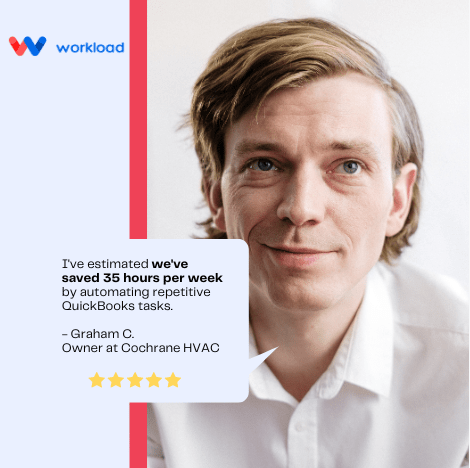
Workload enabled us to seriously increase company efficiency by automating repetitive QuickBooks tasks.
— Graham C., Owner at Cochrane HVAC
35 hrs
saved per week using Workload
Plans for every level of automation
Start free and scale as agents and automations take on more of your business operations—across the apps you already use.
On all plans
Upgrade anytime
✔️Downgrade anytime
✔️Cancel anytime
Basic
$0.00/mo
free forever
- 300 Lifetime Tasks
- 300 Lifetime Tasks
- 1 User
- Unlimited Workflows
- Unlimited Workspaces
- 15 Minute Update Time
- All Integrations & Templates
- AI Workflow Builder Agent
Premium
$49.00/mo
billed annually
Save up to 27%
- 3,000 Tasks/Month
- 3,000 Tasks/Month
- 10 Users
- Unlimited Workflows
- Unlimited Workspaces
- 1 Minute Update Time
- All Integrations & Templates
- AI Workflow Builder Agent
- Priority Support
- AI-powered workflow self-healing
- Auto-fix expired credentials & re-auth
- Auto-fix filtering & mapping errors
- Auto-adapt to API schema changes
Enterprise
$299.00/mo
billed annually
Save up to 27%
- 100,000 Tasks/Month
- 100,000 Tasks/Month
- 50 Users
- Unlimited Workflows
- Unlimited Workspaces
- 1 Minute Update Time
- All Integrations & Templates
- AI Workflow Builder Agent
- Priority Support
- Custom Integrations
- Dedicated Account Manager
- SLA Guarantee
- Detailed repair logs & audit trails
- Governance & manual approval gates
- Advanced observability dashboard
- Multi-workflow system monitoring
What work would you stop doing manually tomorrow?
Describe the job. Workload will help you turn it into an automation that runs across the tools you already use.
Start free • No credit card required
Frequently Asked Questions
What are tasks and how many will I need?
A task is counted every time an automation successfully moves data or takes action for you. For example, if your automation creates a new Google Contact, each contact that is created will use one task.
The number of tasks you need depends on how many automations you run and how often they execute. Don’t worry, if you use up all your tasks in a given month we’ll hold your tasks until you upgrade or your monthly usage resets. If you use more than 2 million tasks, you will be billed at a per-task rate of $0.001 USD
How does Workload’s pricing work?
The free version of Workload is available for teams of up to 3 people. Workload Professional starts at $49 per month when billed annually. The price of Workload Enterprise starts at $299 per month when billed annually.
What forms of payment do you accept?
You can purchase Workload with any major credit card. For annual subscriptions over Enterprise standard, we can issue an invoice payable by bank transfer or check. Please contact us to arrange an invoice purchase. Monthly purchases must be made by credit card.
We need to change our plan. How does that work?
You will be able to upgrade or downgrade your plan at any given time, even before you run out of tasks. When you update your subscription, the change will take effect immediately, and a prorated charge or credit will be applied to your account.
How secure is Workload?
Protecting your data and credentials you trust to Workload is our top priority. We use physical, procedural, and technical safeguards to ensure security of your information. We regularly back up our systems to prevent data loss and to aid in recovery. Additionally, we host our data and servers in a secure SSAE16 / SOC2 certified data center, implement firewalls and access restrictions on our systems to ensure our practices are secure.
Is there an on-premises version of Workload?
We are extremely passionate about cloud-based software and the web. We do not plan to offer an internally hosted version of Workload. This enables us to ensure you are getting maximum value at all times when using our product.
How do I cancel my Workload subscription or trial?
It’s easy to cancel your subscription. To cancel a paid plan, log into the Workload account you wish to cancel, click your profile icon in the upper right corner and select “Plans” from the dropdown. Only a billing owner of a paid plan is able to cancel. To cancel a trial, follow the same steps and click Cancel trial. You can cancel at any time. If you cancel before your next billing date, you will not be charged. If you cancel a paid plan, you will automatically be downgraded to Workload Basic and will lose any data associated with the features of the paid plan.